SAML2
- Enabled. If selected, the user can login using saml2.
- Standard. If selected, then saml2 is the standard login method and will be used automatically when logging in.
- Display name. The text that is displayed to the users on the button for saml2.
Stratsys SP
- Metadata url. This is the metadata that the Stratsys platform IdP publishes about itself. The format is
https://login.stratsys.se/[tenantId]/saml2/spmetadata.xmlwhere tenantId is the customer id in the platform. - Metadata version. Stratsys provides several versions of metadata. Read more about the different versions here.
- Enable single logout (SLO). When enabled a user sign out will trigger a sign out request from the customer’s IdP.
- Regex username. Used if a customer needs to transform incoming claim for username. For example,
^.*?(?=@)matches everything before “@”.
External IdP
Metadata url. Insert your metadata url from you IdP here.
- For example, Azure AD publishes federation metadata at
https://login.microsoftonline.com/<TenantId>/FederationMetadata/2007-06/FederationMetadata.xml. - A thumbs up next to the copy button will indicate that the metadata is valid. A thumbs down means the opposite.
Tip
The metadata is cached up to 72 hours, but can be cleared by clicking Clear cache.
- For example, Azure AD publishes federation metadata at
Use explicit configuration and ignore metadata from url. If no public metadata url is available for your IdP, the configuration can also be made manually.
Name Identifier. Defines the name identifier formats supported by the identity provider. For example, specify
urn:oasis:names:tc:SAML:1.1:nameid-format:emailAddressto use the email address format.
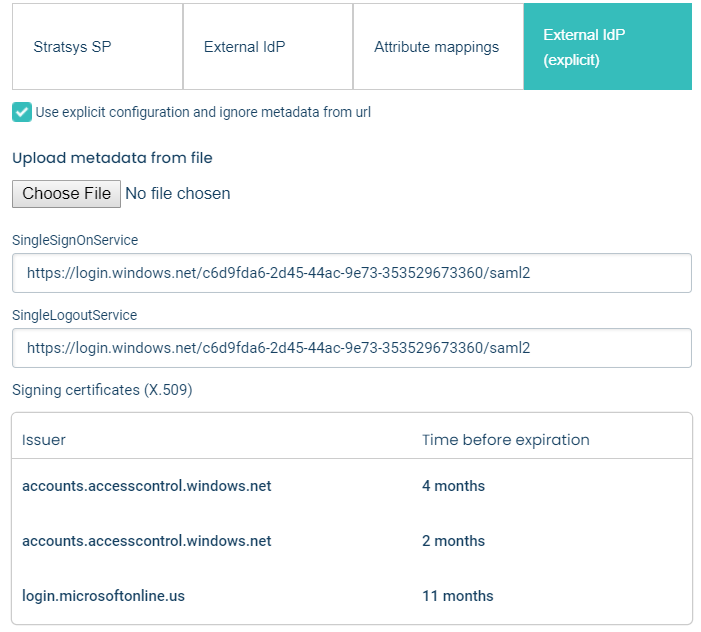
External IdP (explicit)
- Use explicit configuration and ignore metadata from url. If checked, a file containing metadata needs to be provided. Bear in mind that this has the effect that the metadata might not be up to date.
- Signing certificates (X.509). The certificate(s) for signing the SAML communication provided in the metadata. Certificates are clickable and can also be removed.
Attribute mappings
- If a mapping needs to be done from a saml
Attributeto the Username, First name, Last name or Email claim, this is done here.
Note
Attribute mapping is only used in just-in-time user provisioning.
Metadata versions
- New metadata versions are only added if some form of breaking change in our saml2 login handling is introduced regarding functionality or url’s. Configuration of older metadata versions are supported as of now.
MetadataUrl=https://login.stratsys.se/[tenantId]/saml2/spmetadata.xml
Note
Although Stratsys provides several versions of metadata we recommend using the latest configuration (currently v3).
Metadata v3
Changes from earlier version: - Includes a public X509 certificate for signature validation.
Metadata v2
Changes from earlier version:
- No proxy detour.
EntityID=https://login.stratsys.se/[tenantId]AssertionConsumerService=https://login.stratsys.se/[tenantId]/saml2/ssoSingleLogoutService=https://login.stratsys.se/[tenantId]/saml2/slo
Metadata v1
Changes from earlier version:
- Supports logout.
- Supports multitenancy.
EntityID=https://proxy.stratsys.se/[tenantId]/saml2AssertionConsumerService=https://proxy.stratsys.se/[tenantId]/saml2SingleLogoutService=https://proxy.stratsys.se/[tenantId]/saml2
Metadata v0
- No support for log out.
- Same
EntityIDfor all tenantId’s. EntityID=https://proxy.stratsys.se/SAML2AssertionConsumerService=https://proxy.stratsys.se/saml2
Just-in-time (JIT) user provisioning
- Use just-in-time user provisioning to allow users logging in for the first time using single sign-on to automatically be created in the platform.
- The user is created according to the mapping made in attribute mappings.
- Enabled by clicking User provisioning and click the Just-in-time user provisioning checkbox.
- If the Username claim is not mapped, it falls back on the
Subject.NameId. - Email falls back to Username if the latter is a valid e-mail address.
Note
Except for the fallback rules above, creation of users using user-provisioning follows the same rules as when creating user in the administration or using the api. This means that First name and Last name cannot be empty.
Configuration Azure AD
Note
We use the fictional customer mycustomer for illustration purposes in this example.
First, login to the Platform Administration. Then go to the settings page, and in the Stratsys SP tab copy the Metadata url.
Paste the Metadata url into a browser window. In Chrome it looks like this:
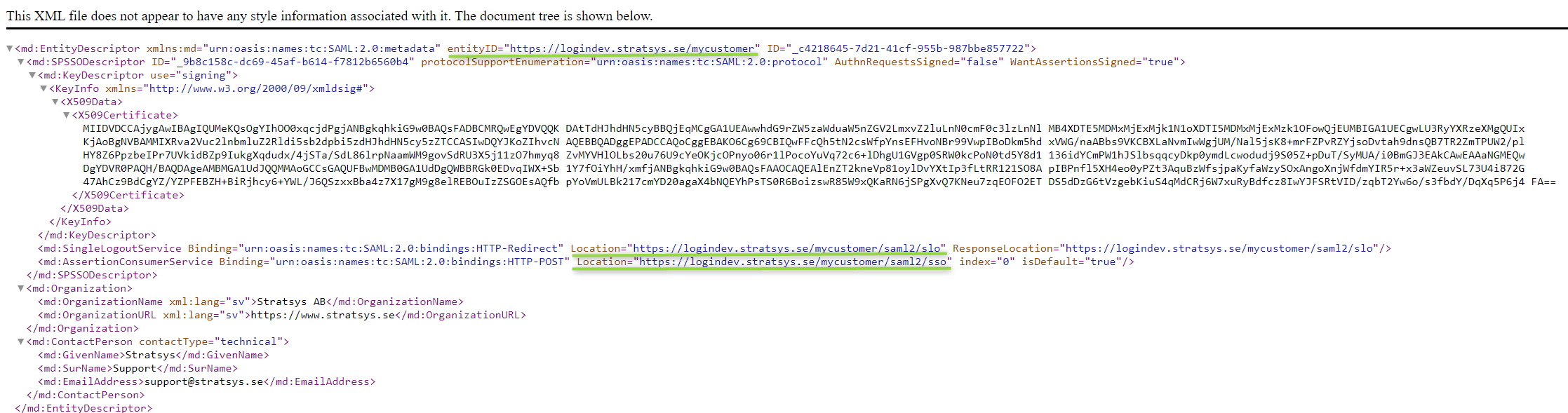
Copy the
EntityID,Assertion Consumer Serviceand theSingleLogoutServicevalues, we will use them when setting up our Azure AD application.Go to https://portal.azure.com and register a new application.
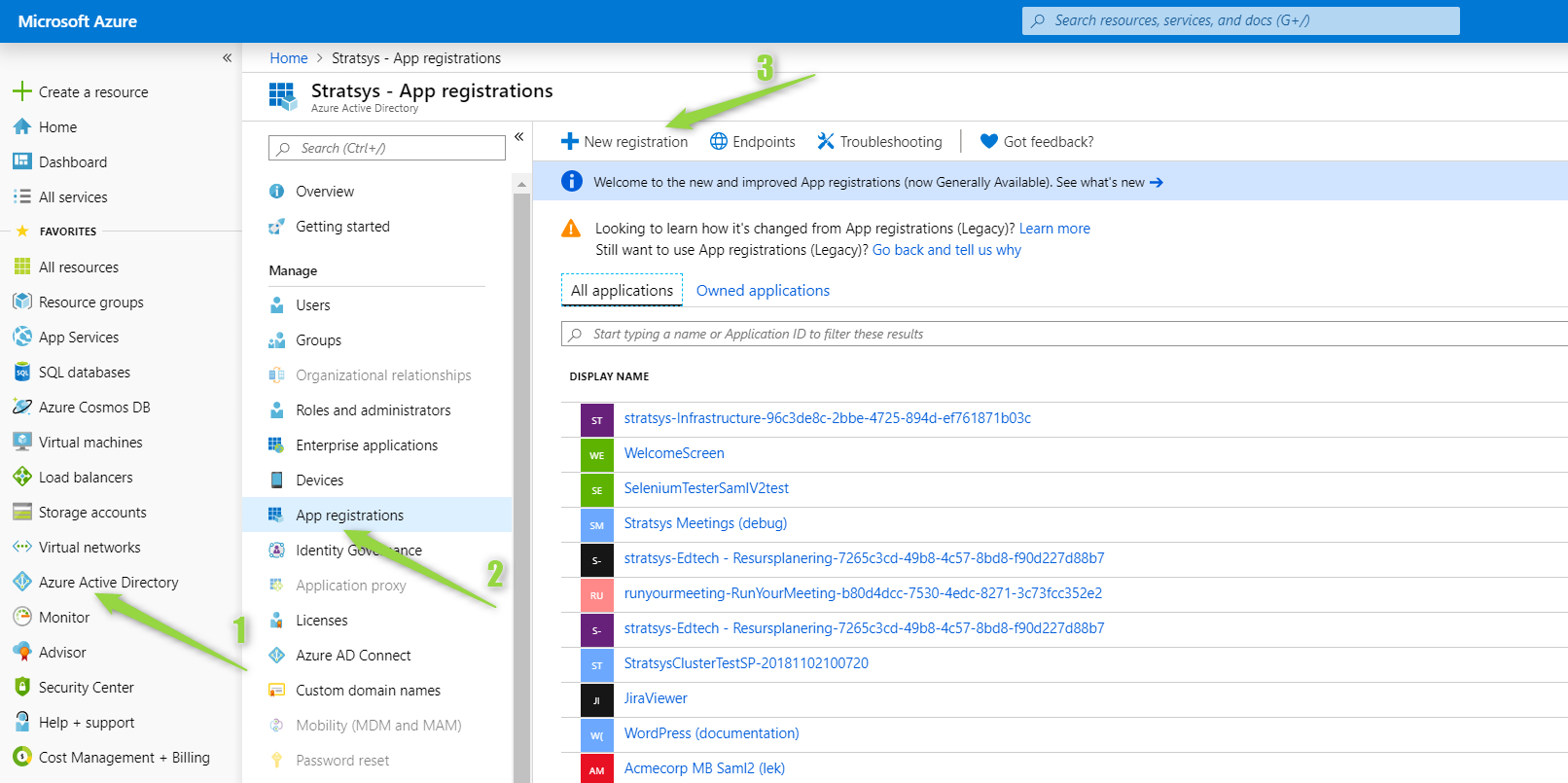
Register an application - The Redirect URI should be set to the
Assertion Consumer Service.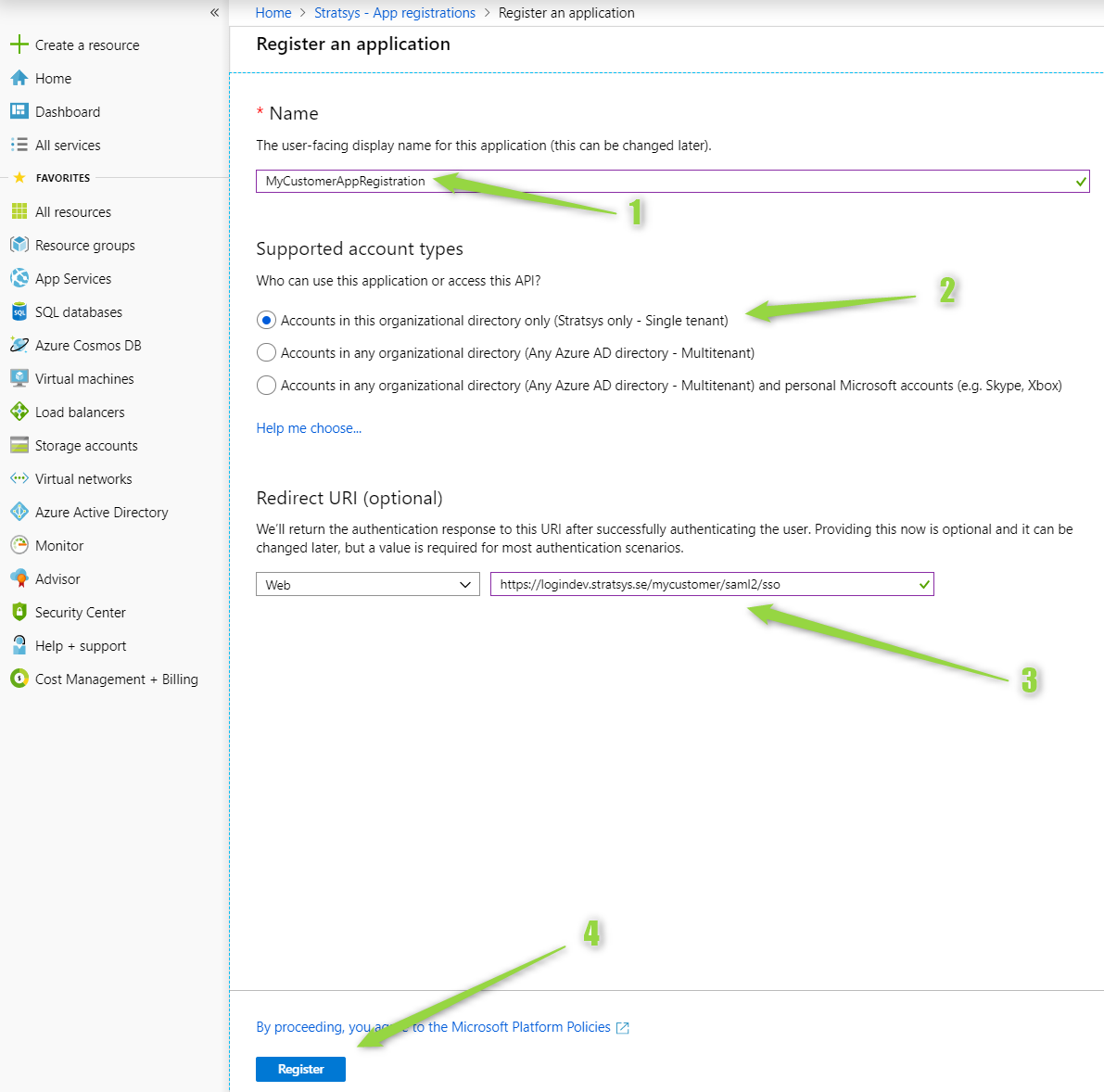
Set an app ID; the globally unique URI used to identify the app. The
EntityIDis a good candidate for this value.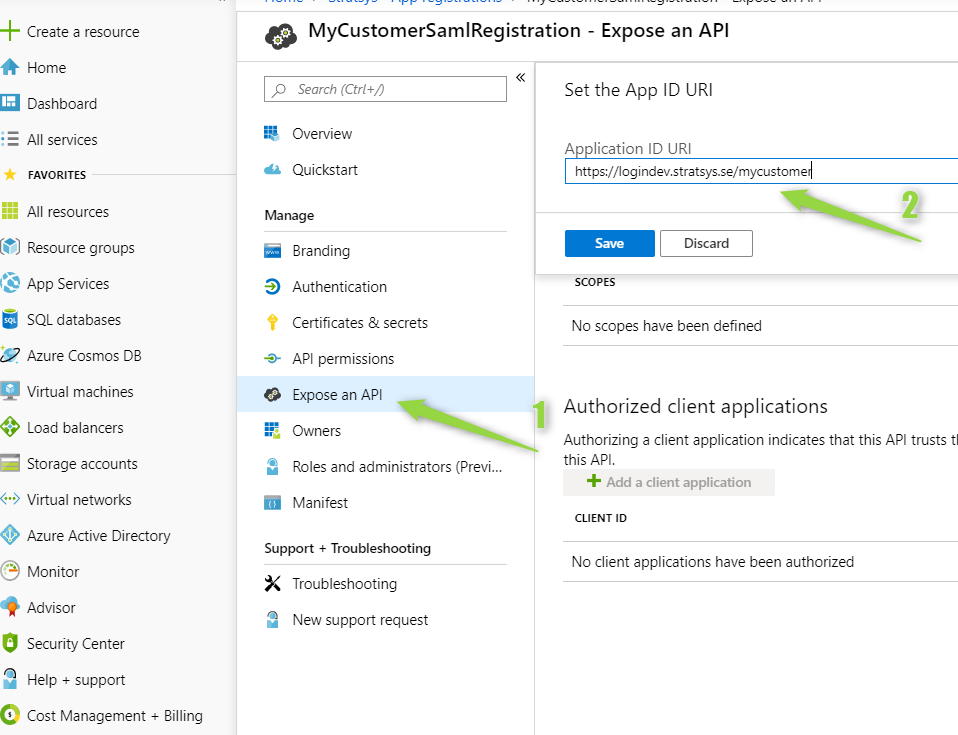
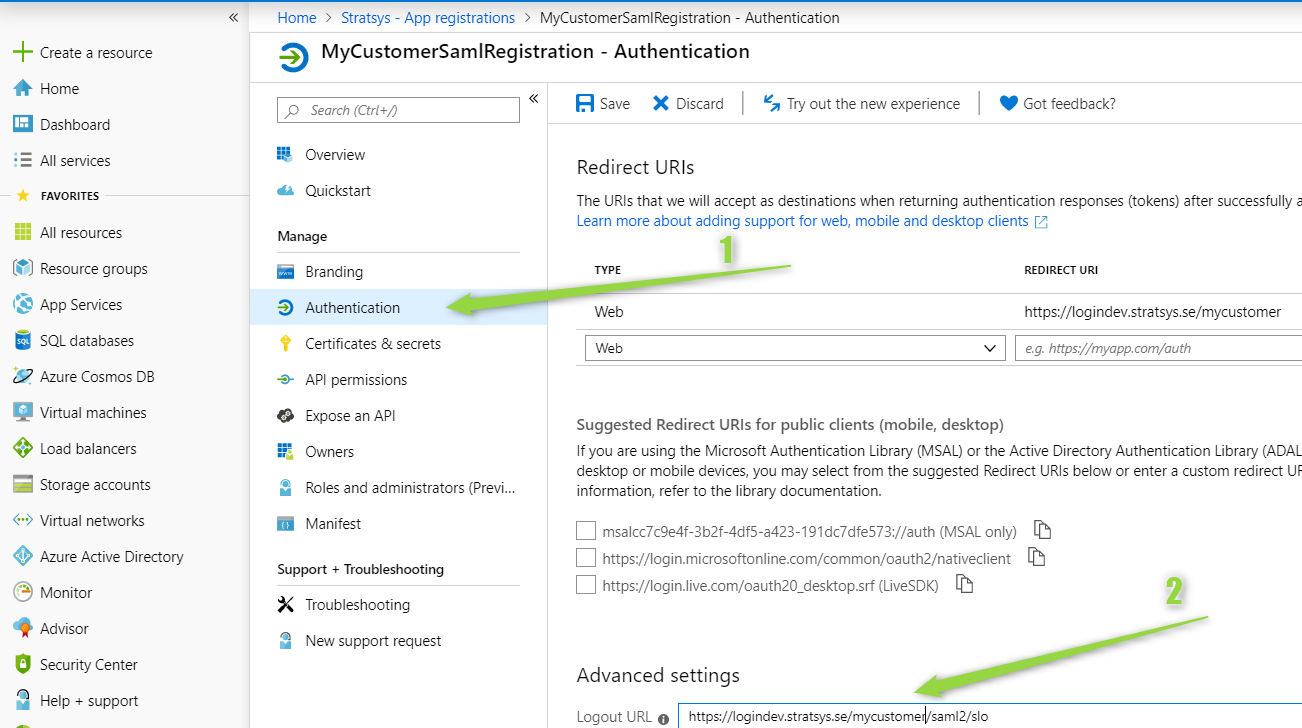
(Optional) Set a logout url. This is required for single sign-out to work correctly. Use the
SingleLogoutServicevalue.